SerpApi
注意
本教程为社区贡献内容,不属于 OPL 数据空间团队的官方支持范围。它主要演示如何按你的具体场景定制 OPL 数据空间。若想参与贡献,请查看贡献指南。
提示
关于 Web Search 相关环境变量的完整列表,包括并发、返回结果数量等,请参阅 环境配置文档。
Troubleshooting
如果 Web Search 出现问题,请先查看 Web Search 故障排查指南,里面覆盖了代理配置、连接超时、空内容等常见问题。
SerpApi API
SerpApi 提供对 Google 及其他搜索引擎的快速搜索 API。凡是会返回 organic_results 的现有或未来 SERP 引擎,理论上都可支持。默认搜索引擎为 google,也可以换成 bing、baidu、google_news、google_scholar、google_patents 等。
设置
- 前往 SerpApi,登录或创建账号
- 在
Dashboard中复制 API Key - 拿着 API key,打开
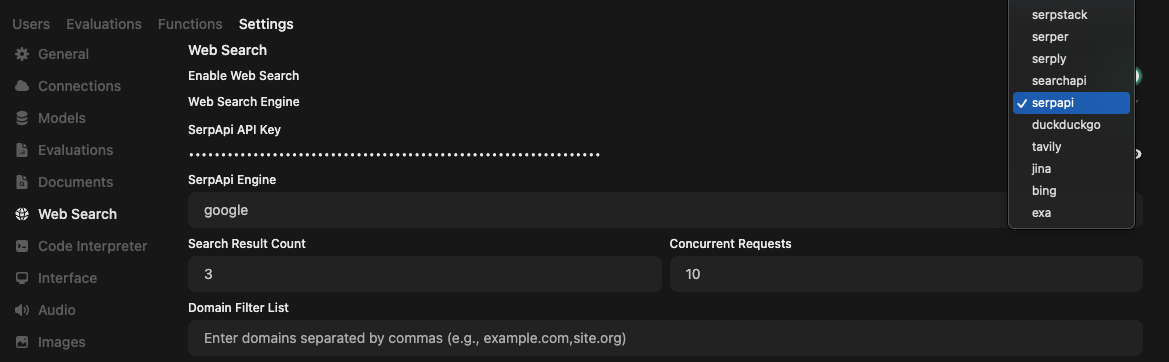
OPL 数据空间 Admin panel,进入设置→Web Search - 启用
Web search,并将Web Search Engine设为serpapi - 在
SerpApi API Key中填入刚复制的 key - 可选:填写希望使用的
SerpApi engine,例如google、bing、baidu、google_news、google_videos、google_scholar、google_patents。默认是google - 点击
Save
注意
你还需要在聊天提示框里启用 Web search,才能真正通过 SerpApi 发起网页搜索。